icon: LiCodeSquare快速命令
简介
快速命令工具让使用者能快速地搜索特定命令并执行。一些典型的命令如下:
- merge选中的节点
- 整理选中节点
- 打开python shell界面
- 整理节点
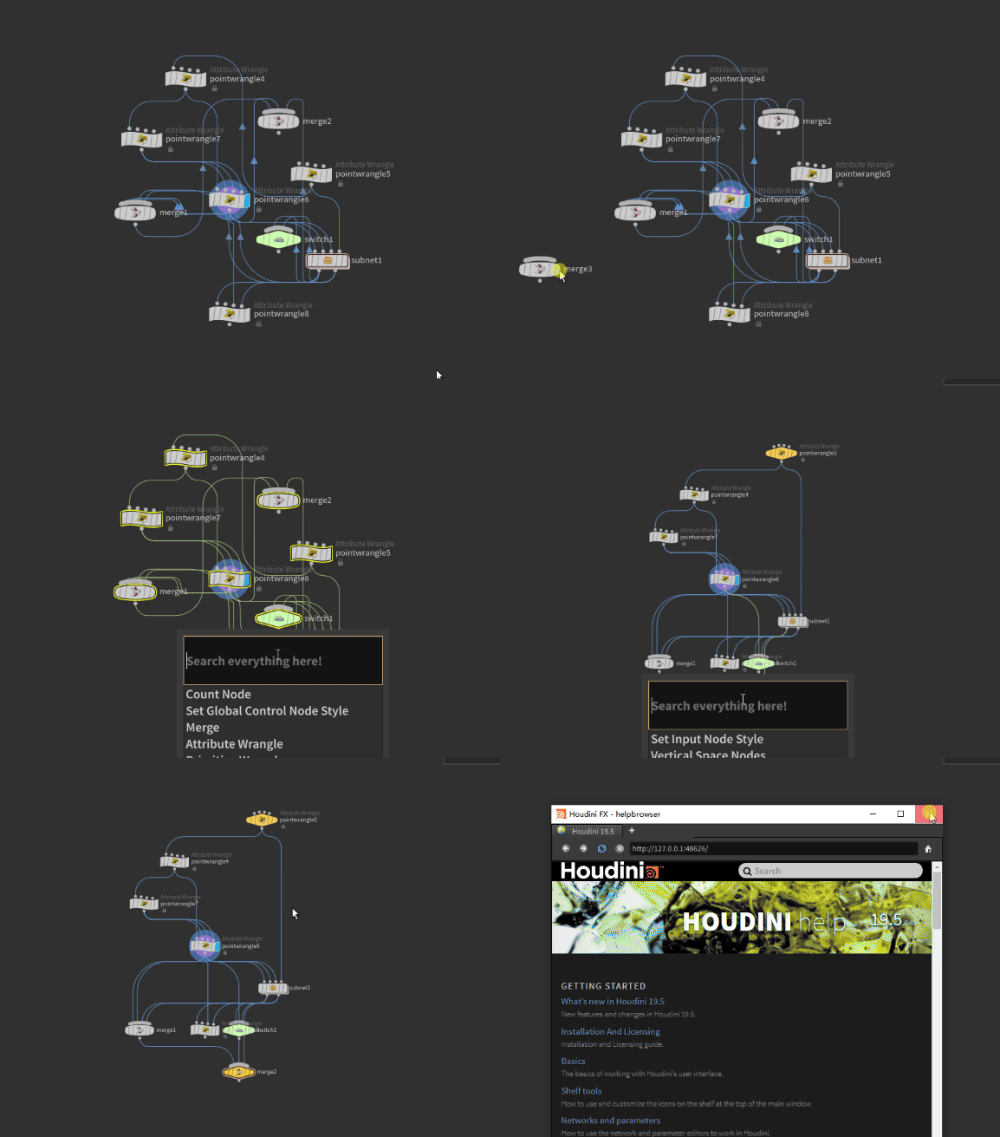
使用方法
用户在Network Editor,也就是节点编辑器面板,按下Ctrl+Space即可唤出快速命令搜索框,按照关键词搜索对应的命令,搜索后按下回车即可执行命令,按下Esc即可退出搜索窗口。
自定义命令
快速命令工具中的命令是可高度自定义的。用户目前可通过两种形式扩展命令。
自定义任何命令
注册命令
快速命令工具提供了一个能完全自定义任何命令的框架。
- 打开
$HOUDINI_USER_PREF_DIR/DolagPlugin/user_data/UserCustomConsoleItems.py文件。 - 创建自定义指令的回调函数,回调函数会接受一个上下文参数。后文会详细介绍上下文参数的作用。
- 创建快捷指令对象。您需要配置快捷指令的名称、回调函数、别名及其是否优先显示。
ConsoleItem(item_name, callback, alias=tuple(), important=False) - 将创建的快捷指令对象插入列表
USER_CUSTOM_ITEMS中,插件会自动读取加载此列表。
# 1. 创建该指令的回调函数
def switch_selected_cb(context):
    if len(context["selected_nodes"]) > 0:
        network = context["network_node"]
        switch_node = network.createNode("switch")
        index = 0
        for node in context["selected_nodes"]:
            for i in range(len(node.outputNames())):
                switch_node.setInput(index, node, i)
                index += 1

        switch_node.setPosition(context["editor_pos"])

# 2. 创建快捷指令项
tmp_item = ConsoleItem(item_name="Switch Selected", alias="switch", callback=switch_selected_cb)

# 3. 将创建的快捷指令添加到指令列表中
USER_CUSTOM_ITEMS.append(tmp_item)
context
回调函数会传入一个表示上下文的context参数,context参数记录了快速命令所需的一些属性,可作为字典访问对应属性。其键和值如下:
- selected_nodes: 选中节点的元组,如果没有选中则返回空元组
- hit_item: 在鼠标下方的节点,如果没用则返回None
- screen_pos: 鼠标在屏幕上的绝对位置,元组类型
- editor_pos: 鼠标在Network Editor上的绝对位置,采用Network Editor的坐标系和单位,元组类型
- editor: 当前Network Editor对象
- qt_keys: 按下了哪些键,其值为PySide2中的key值
- network_node: 当前Network Editor面板所显示的Network节点 快速命令工具会在合适的时候执行用户传入的callback回调函数。
避免UI线程被阻塞
Houdini中的UI线程表现比较奇怪,在某些时候一些命令(比如subprocess.call, os.system等)会导致UI线程被阻塞,因此需要使用threading模块新开线程(进程)来避免阻塞。 例如快速命令中有Edit Code in VSC命令,打开VSC来编辑节点中的Vex和Python。其调用的函数使用了threading.thread来开启新线程(进程),以避免阻塞。调用的函数代码如下:
def openVexInVSC(vex_str):
	if not isinstance(vex_str, str):
		return

	# escape quotes
	vex_str = vex_str.replace("\"", "`")

	# to avoid blocking houdini, we have to use threading
	def __tmp_vex_vsc_func():
		import subprocess
		subprocess.call(["powershell", "-WindowStyle", "hidden", "-Command", r'''"{0}" | code -
		exit'''.format(vex_str)], shell=False)


	import threading
	t = threading.Thread(target=__tmp_vex_vsc_func)
	t.start()
自定义节点创建命令
用户可以在$HOUDINI_USER_PREF_DIR/DolagPlugin/user_data/user_console_items.json文件中添加自己的节点创建命令。
[
  ...
  {
    "item_name": "Subdivide",
    "alias": "sd",
    "important": true,
    "type": "node"
    "node_name": "subdivide"
  }
]